Distributed Secondo
Overview
Distributed Secondo is an extensible, highly available and scalable database management system. It uses Apache Cassandra for data storage and Secondo as a query processing engine.
As the name implies, Distributed Secondo is a distributed system. It consists of three different node types: storage nodes, query processing nodes and management nodes. The storage nodes run Apache Cassandra to provide highly available data storage. The query processing nodes run Secondo for query processing, together with a tool called Query Executor that distributes the queries. Each Query Executor instance determines which queries need to be executed and which part of the input data must be processed by the local Secondo installation. This decision depends on the state of the storage nodes and on heartbeat messages. The Query Executor can deal with failing processing nodes and it is capable of addressing multiple Secondo instances at the same time, which is useful when a processing node has more than one core available for query processing. The management nodes also run Secondo and are used to import and export data and to specify the queries that should be executed.
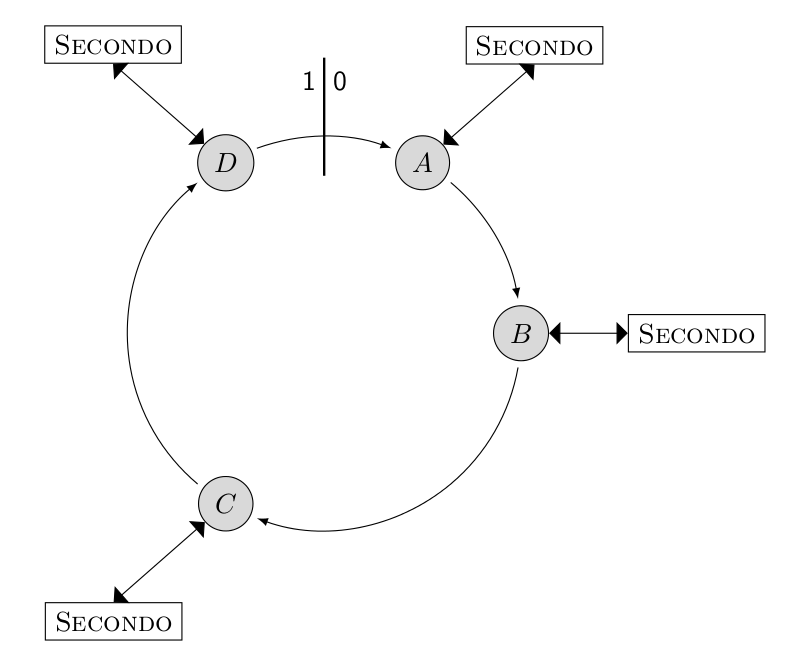
Distributed Secondo ships with a graphical user interface. The GUI shows the state of the query processing nodes and the progress of a query in real time.
An Example
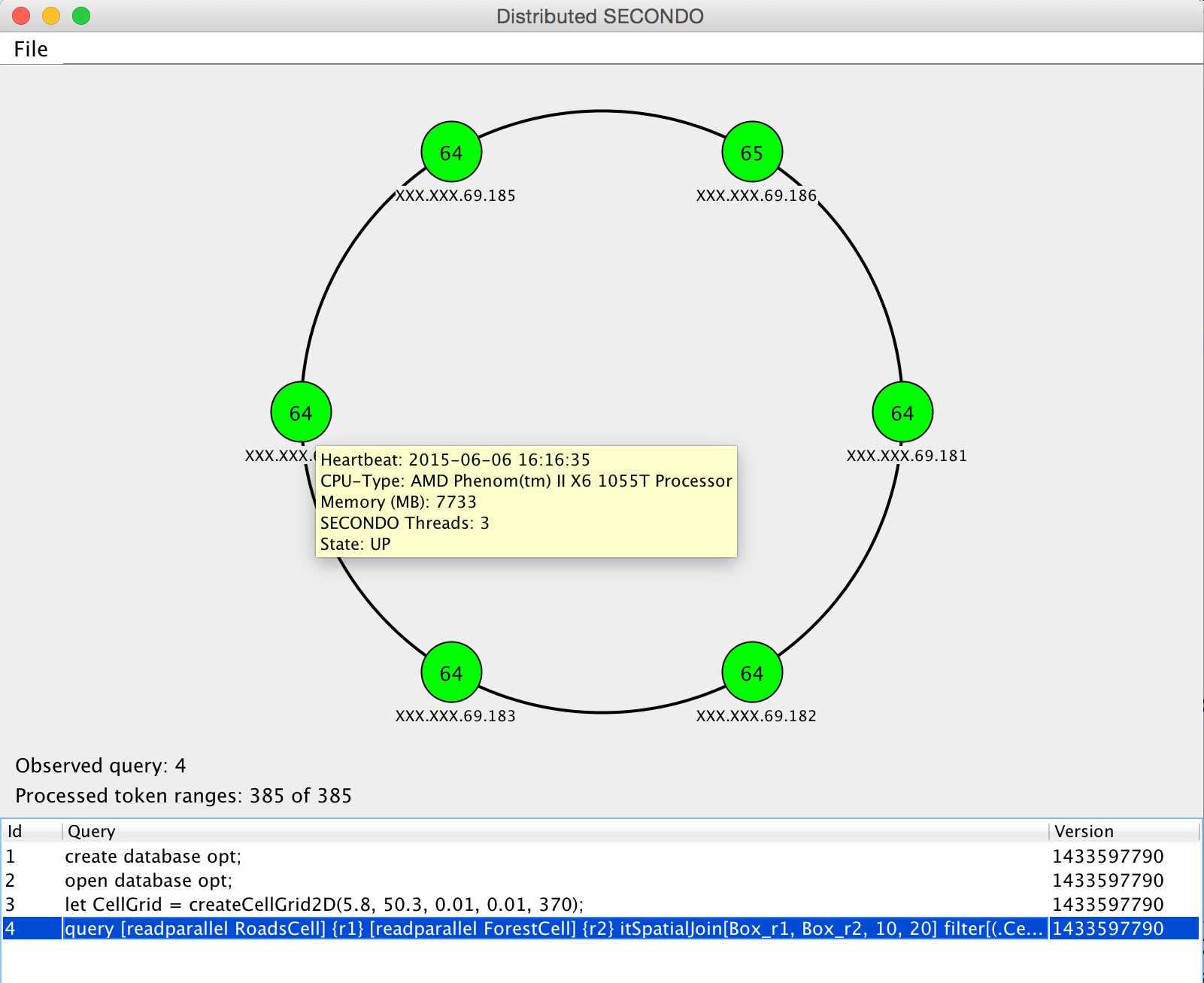
Secondo should perform an equi-join on the two relations
Customer and Revenue over the attribute Customerid. Both
relations are assumed to be stored as relations in Secondo already.
The Sequential Version
The sequential version is very simple: Secondo reads both relations, computes the result and stores it as a new relation. Secondo offers a comprehensive set of join operators, so the computation can be done with a single query:
let join_result = customer feed {r1} revenue feed {r2}
    itHashJoin[customerid_r1, customerid_r2] consume;
To learn more about the Secondo query language, see the executable language guide.
The Parallel Version
In the first step, both relations are exported to Cassandra with the cspread operator.
This operator reads all tuples from a relation and stores them in Cassandra. In addition, a partition
key must be specified. The partition key determines which attribute governs the placement of a tuple
within the logical ring. Secondo has to join both relations on the
attribute customerid, so tuples with the same customerid have to be placed
at the same position in the logical ring.
The export of the relations into Cassandra is done with the following two queries:
query customer feed cspread['customer', customerid];
query revenue feed cspread['revenue', customerid];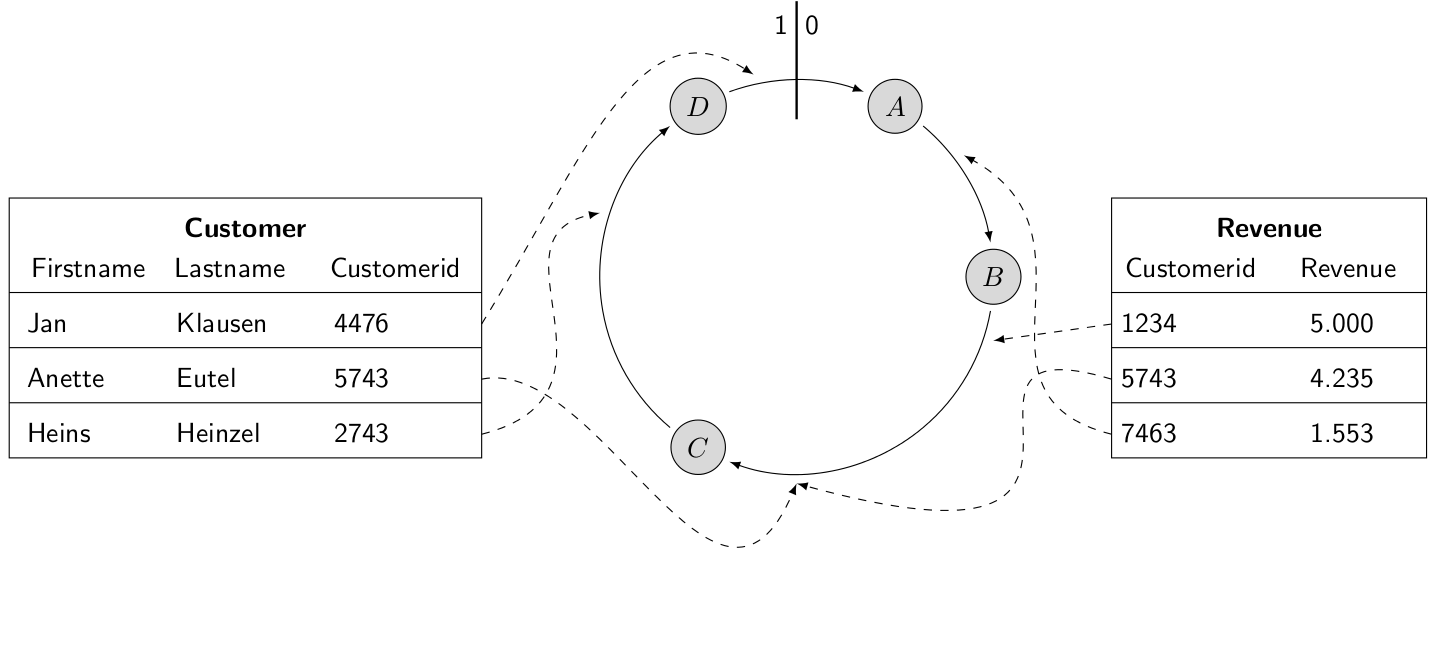
The following step is the most complicated one: an execution plan must be created for all query processing nodes. The execution plan consists of two queries. The first query opens a database, after which Secondo is ready to process queries. The second query imports parts of the relations from Cassandra, executes the join and writes the data back into Cassandra.
query cqueryexecute(1, 'open database opt;');

query cqueryexecute(2, 'query [readparallel customer] {r1}
    [readparallel revenue] {r2}
    itHashJoin[customerid_r1, customerid_r2]
    [write join_result customerid_r1];');
After executing these queries the execution plan is created, and each query processing node starts to fetch data, compute a part of the join and write the result back into Cassandra.
In the penultimate step, Secondo waits for the join (query id 2) to complete:
query cquerywait(2);Once the query finishes, the join is fully computed and the result is stored in Cassandra. In the last step, Secondo imports the join result back into the local Secondo instance:
let join_result = ccollectquery('join_result', 2) consume;Installation
Like Secondo and Cassandra, Distributed Secondo is freely available for download. The following steps show how the system is installed and configured.
Prerequisites
At least one system running Ubuntu 14.04 or Debian 7/8 Linux is required. The packages
ssh, screen, java, git, gcc and
make should be installed on this system.
Installing a Management Node
-
Install the required software components:
apt-get install cmake libtool automake git openssh-client \ screen build-essential libssl-dev -
Define and create the Distributed Secondo home:
export DSECONDO_DIR=~/dsecondo/ mkdir -p $DSECONDO_DIR mkdir -p $DSECONDO_DIR/secondo -
Download the latest Secondo version (at least version 4.0.0 is required).
-
Configure and install Secondo as described on the installation page.
-
Add these lines to your .secondorc and adjust the names of the query processing nodes and storage nodes. The placeholder
%%YOUR_DSECONDO_DIR%%needs to be replaced with the full path of$DSECONDO_DIR. The placeholder%%YOUR_QPN_INSTALL_DIR%%needs to be replaced with the directory where Secondo should be installed on the query processing nodes (e.g. /opt/dsecondo).### # DSECONDO ### export DSECONDO_DIR=%%YOUR_DSECONDO_DIR%% export DSECONDO_QPN_DIR=%%YOUR_QPN_INSTALL_DIR%% # Locate the libuv and cpp-driver installation dir if [ -d $DSECONDO_DIR/driver/libuv ]; then export LD_LIBRARY_PATH=$DSECONDO_DIR/driver/libuv/.libs:$LD_LIBRARY_PATH export LD_LIBRARY_PATH=$DSECONDO_DIR/driver/cpp-driver:$LD_LIBRARY_PATH else export LD_LIBRARY_PATH=$DSECONDO_QPN_DIR/driver/libuv/.libs:$LD_LIBRARY_PATH export LD_LIBRARY_PATH=$DSECONDO_QPN_DIR/driver/cpp-driver:$LD_LIBRARY_PATH fi # DSECONDO - Hostnames of the QPNs export DSECONDO_QPN="node1 node2 node3 node4 node5 node6" # DSECONDO - Hostnames of the SNs export DSECONDO_SN="node1 node2 node3 node4 node5 node6" -
Re-read your .secondorc:
source ~/.secondorc -
Download, patch, build and install the cpp-driver and its dependencies:
cd $DSECONDO_DIR/Algebras/Cassandra/tools ./manage_dsecondo.sh install_driver -
Add the following lines to the file makefile.algebras to enable the Cassandra algebra:
ALGEBRA_DIRS += Cassandra ALGEBRAS += CassandraAlgebra ALGEBRA_DEPS += uv cassandra ALGEBRA_INCLUDE_DIRS += $(DSECONDO_DIR)/driver/cpp-driver/include ALGEBRA_INCLUDE_DIRS += $(DSECONDO_DIR)/driver/libuv/include ALGEBRA_DEP_DIRS += $(DSECONDO_DIR)/driver/libuv/.libs ALGEBRA_DEP_DIRS += $(DSECONDO_DIR)/driver/cpp-driver -
Build Secondo:
cd $DSECONDO_DIR/secondo make -
Add the following lines to the configuration file of Secondo (SecondoConfig.ini). The placeholder
%%SN_IP%%has to be replaced with the IP of one of the storage nodes.[CassandraAlgebra] CassandraHost=%%SN_IP%% CassandraKeyspace=keyspace_r3 CassandraConsistency=QUORUM CassandraDefaultNodename=node1
Installing the Query Processing Nodes
The management node is responsible for installing the query processing nodes. Execute the following steps to install these nodes:
-
On the management node, change into the tools directory:
cd $DSECONDO_DIR/secondo/Algebras/Cassandra/tools -
Run the query processing node installer. The installer copies your Secondo installation and the cpp-driver onto the nodes.
./manage_dsecondo.sh install
Installing the Storage Nodes
-
On the management node, change into the tools directory:
cd $DSECONDO_DIR/secondo/Algebras/Cassandra/tools -
Run the storage node installer. The installer downloads and unpacks Cassandra and applies a basic configuration.
./manage_cassandra.sh install -
Start the storage nodes:
./manage_cassandra.sh start -
Create the default keyspaces (
keyspace_r1–keyspace_r6) and system tables. The keyspacekeyspace_r1has a replication factor of 1,keyspace_r6has a replication factor of 6../manage_cassandra.sh init
Related Work
With Parallel Secondo, another Secondo-based prototype for distributed processing of large amounts of data exists. Parallel Secondo couples Hadoop with Secondo to achieve scalability and data distribution. In contrast to Distributed Secondo, Parallel Secondo does not focus on data updates, and its architecture contains a master node, which is a single point of failure.
Documentation and Papers
About Us
Our group is a database research group at FernUniversität in Hagen, Germany, led by Prof. Dr. Ralf Hartmut Güting. The group focuses on database technologies for non-standard data types, especially moving objects data, and on extensible database systems. The group has developed the Secondo system, an open-source extensible DBMS prototype.